Escape from Playtime Screenshots: Full Image Gallery
Explore every official Escape from Playtime screenshot, learn what the visuals reveal about the game, and find the best galleries and image sources.
Why Escape from Playtime Screenshots Are Worth a Close Look
If you've been following the horror game scene, the wave of Escape from Playtime screenshots circulating online has probably caught your eye. These images aren't just promotional filler — they're the clearest window we have into the game's atmosphere, art direction, and level design before you commit your time (and money) to playing. A single well-framed screenshot can tell you whether a horror title leans on dread and darkness or cheap jump scares, and the Escape from Playtime screenshots released so far suggest a moody, toy-box-gone-wrong aesthetic that fans of the genre will recognize instantly.
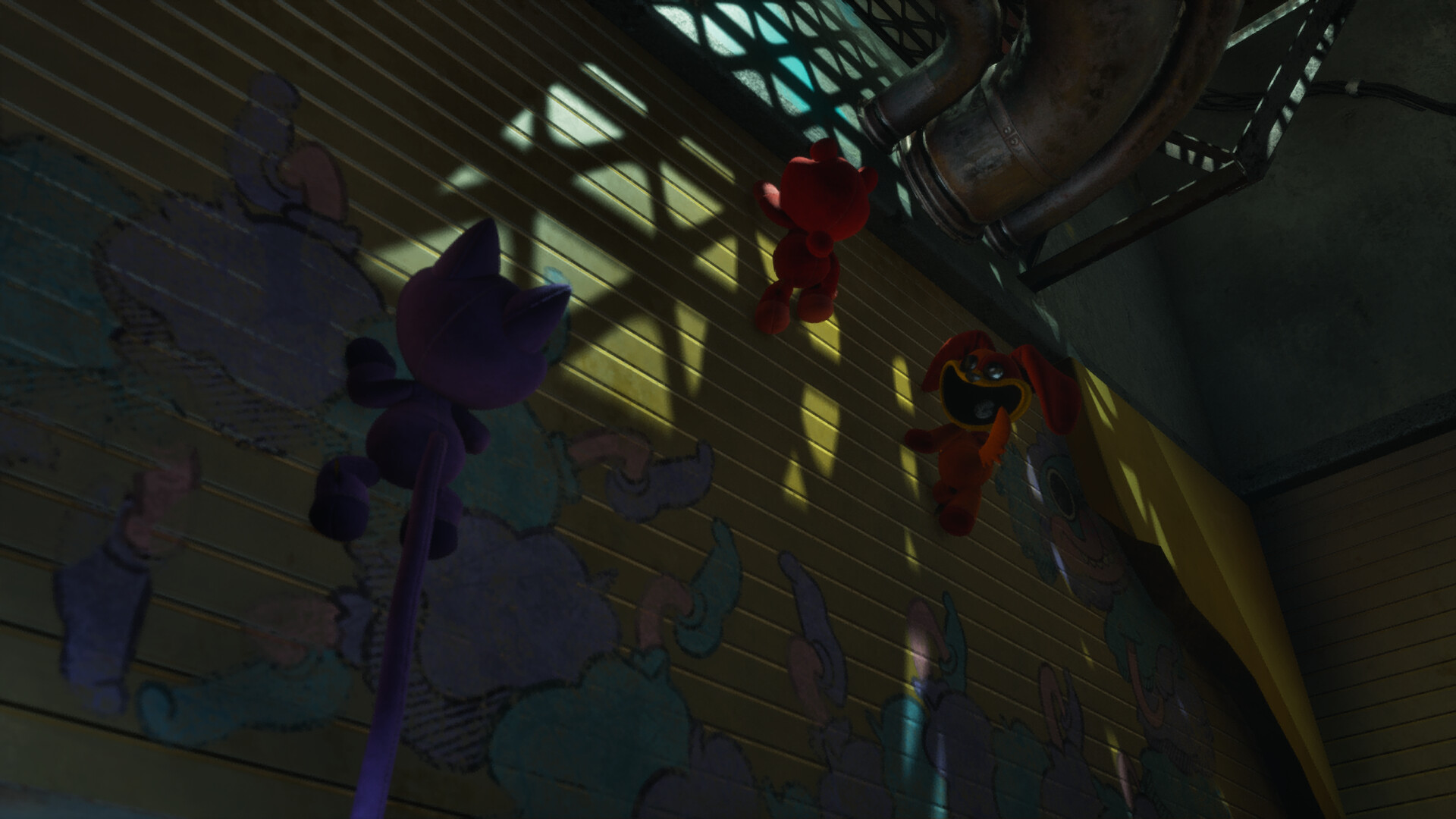
Official screenshot · Source: Steam store
In this guide, we'll break down where to find the best Escape from Playtime screenshot galleries, what the imagery reveals about the game's tone and mechanics, and how to interpret visual clues like lighting, environment design, and enemy hints. Whether you're deciding whether to buy or just building hype, here's everything the images are telling us.
Where to Find Official Escape from Playtime Screenshots
Not all image sources are created equal. Some galleries are compressed, watermarked, or outright stolen from press kits, so it pays to know where the good stuff lives. Based on our research, two primary sources dominate the conversation: the community wiki gallery and mainstream gaming media slideshows.
Here's a quick comparison of the top sources for Escape from Playtime screenshots:
| Source | Image Count | Quality | Notes |
|---|---|---|---|
| IGN slideshow | 9 images | High | Official press-style screenshots, full resolution, easy browsing |
| Poppy Playtime Fandom wiki gallery | Varies (community-maintained) | Mixed | Includes screenshots, concept art, and cropped assets |
| Official Steam store page | Varies | High | Developer-selected images, frequently updated |
| Social media (X/Twitter, Discord) | Ongoing | Mixed | Early peeks, but often compressed |
Why the IGN Gallery Is the Best Starting Point
The Escape from Playtime screenshot slideshow on IGN currently hosts a curated nine-image set. These are the kinds of high-resolution captures typically pulled straight from the developer's press kit, which means no compression artifacts, no watermarks, and framing chosen specifically to showcase the game's strongest visual moments. If you only bookmark one gallery, make it this one — then supplement with community sources for behind-the-scenes material.
What the Wiki Gallery Adds
The community-run wiki gallery serves a different purpose. Beyond polished promotional shots, wikis tend to catalog everything: cropped textures, enemy renders, map fragments, and screenshots extracted from trailers. The trade-off is inconsistency — some images are low resolution or heavily cropped. Still, for lore hunters trying to piece together the game's story from visual details, it's an invaluable resource.
What the Screenshots Reveal About the Game's Visual Identity
Great horror games establish their identity through imagery before a single line of dialogue is heard. Looking at the available Escape from Playtime screenshots, several design threads emerge consistently.
Lighting and Atmosphere
Nearly every image leans on the classic abandoned-playground palette: warm, faded primary colors slowly consumed by shadow and neglect. This contrast — cheerful toy aesthetics rotting into something sinister — is the visual backbone of the game. Pay attention to how the screenshots use:
- Rim lighting on characters to keep them visible in dark corridors
- Colored practical lights (toy-store signage, flickering fluorescents) instead of generic flashlights
- Deep negative space, with darkness occupying much of the frame to build unease
Environment Storytelling
The environments shown in the screenshots do heavy narrative lifting without words. Overturned shelves, scrawled warnings, and half-finished displays suggest a location that was abandoned mid-operation, not shut down cleanly. This kind of environmental storytelling is a hallmark of modern horror design — think of how series like Poppy Playtime and Five Nights at Freddy's use their spaces as puzzles in themselves.
Character and Enemy Design Hints
While we won't spoil specifics, the screenshots featuring creatures follow a recognizable pattern: mascots or toy-like figures rendered just slightly "off." Oversized proportions, frozen grins, and poses that imply movement are all visible in the promotional captures. Community reports suggest that some enemy designs shown in stills appear differently in motion, so treat the images as a starting point rather than the full picture.
Screenshot Gallery Comparison: Which Source Fits Your Needs?
Different players want different things from a screenshot gallery. Here's a breakdown to help you choose:
| Your Goal | Best Source | Why |
|---|---|---|
| Decide whether to buy the game | IGN slideshow or Steam page | Curated, high-quality, representative of actual gameplay visuals |
| Research lore and hidden details | Community wiki gallery | Includes cropped assets, renders, and frame-by-frame trailer captures |
| Wallpaper or art reference | Press kit images via IGN | Full resolution, no watermarks |
| Day-one news and new images | Official social channels | Freshest content, though often compressed |
How to Analyze Game Screenshots Like a Pro
Want to get more out of promotional imagery than a quick scroll? Whether you're evaluating Escape from Playtime screenshots or any other upcoming release, these habits will sharpen your eye.
| Step | What to Check | Why It Matters |
|---|---|---|
| 1 | Image metadata and aspect ratio | Press-kit shots are usually native resolution; stretched or odd-ratio images may be upscaling |
| 2 | UI presence | Screenshots with visible health bars, inventories, or objectives confirm actual gameplay rather than staged renders |
| 3 | Lighting consistency | Uniform lighting across all shots can indicate pre-rendered marketing images |
| 4 | Recurring landmarks | Repeat locations across shots help map out the game's world |
| 5 | Date stamps and version notes | Newer screenshots often reflect graphical improvements over early trailers |
Red Flags to Watch For
Not every circulating image is legit. Be skeptical of:
- Screenshots that look too polished compared to confirmed gameplay footage
- Images with other games' watermarks or UI elements
- "Leaked" captures posted without any source trail
Community reports frequently surface fan-made concepts that get mistaken for official Escape from Playtime screenshots, so always trace an image back to a developer channel or major outlet before treating it as fact.
Screenshot Count and Content Breakdown
Here's what the current publicly available image set covers, based on the IGN slideshow and community cataloging:
| Image Category | Approximate Count | Content Focus |
|---|---|---|
| Environment shots | 4–5 | Corridors, toy-filled rooms, abandoned retail spaces |
| Character/enemy reveals | 2–3 | Mascot-style antagonists in staged poses |
| Gameplay-style captures | 1–2 | Player-perspective views, some UI visible |
This is a modest set by AAA standards, which is normal for an indie-leaning horror title in its promotional cycle. Expect additional screenshots around major milestones — store page launches, demo releases, and seasonal events are the most common moments for fresh image drops.
Tips for Keeping Up With New Screenshots
The image library for any in-development game evolves fast. To stay current without doomscrolling:
- Wishlist the game on Steam — store page images update automatically, and wishlisting surfaces news in your feed
- Follow the developer's official channels rather than repost accounts, which often compress images
- Check the wiki gallery periodically — community editors usually catalog new official screenshots within days of release
- Set Google Alerts for the game's name plus terms like "screenshots" or "gallery" for passive updates
Frequently Asked Questions
How many official Escape from Playtime screenshots are available?
The main curated gallery, hosted by IGN, currently contains nine images. Additional screenshots and related artwork can be found on the community wiki, which catalogs promotional material, trailer captures, and renders beyond the official press set.
Where can I download Escape from Playtime screenshots in full resolution?
The IGN slideshow is your best bet for high-resolution, watermark-free images. Steam store page media is another reliable source, as developers typically upload native-resolution captures there. Avoid screenshot aggregator sites, which frequently recompress images.
Are the screenshots actual gameplay or promotional renders?
It's a mix, as is common in the industry. Some Escape from Playtime screenshots show in-engine gameplay with visible UI, while others are staged character and environment shots designed to highlight art direction. Check for on-screen interface elements to tell them apart.
Do the screenshots contain story spoilers?
Generally, no. Promotional galleries are curated to entice rather than reveal, so major twists and late-game areas almost never appear. Community wiki galleries carry a slightly higher spoiler risk since they include trailer frame captures and asset extracts — browse with care if you want to go in fresh.
The Escape from Playtime screenshots released so far paint a confident picture: a game that understands its visual identity and isn't afraid to lean into toy-box horror's unsettling contrast of cheer and decay. Bookmark the official galleries, keep an eye on the store page for fresh drops, and you'll be among the first to see how this eerie world takes shape.
Related Guides
Escape from Playtime Official Gameplay: What We Know
A full breakdown of Escape from Playtime official gameplay — co-op horror, The Voice, procedural factory maps, Early Access date, and system specs.
Escape from Playtime Trailer Breakdown: Release Date & Beta
Every Escape from Playtime trailer analyzed — release date, Open Beta details, co-op survival gameplay, and what it means for the Poppy Playtime story.